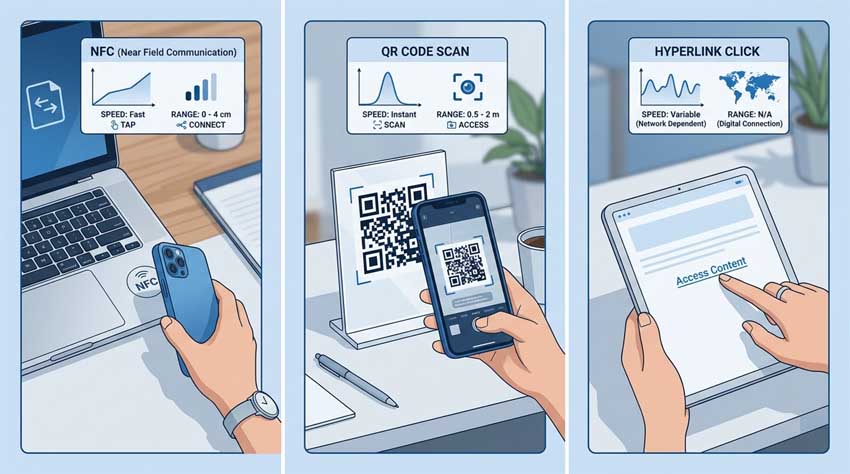
With AAClick Click Card, you can share your digital VCard in three ways: NFC, QR code, or a short link. Which is best? It depends on the situation. Let’s compare.
NFC (Near Field Communication)
- How it works: Tap your phone or NFC tag against another NFC-enabled phone.
- Best for: In-person meetings, conferences, trade shows.
- Pros: Fastest (one tap, no app needed on modern phones), feels high-tech.
- Cons: Both devices need NFC; not all phones support it; requires physical tag or NFC card (1–1–5).
- AAClick integration: We provide an NFC URL. Tape it to your laptop, badge, or buy our NFC card.
QR Code
- How it works: Person scans the code with their phone camera.
- Best for: Posters, booths, printed materials, restaurant tables.
- Pros: Works on any smartphone; no special hardware; printable and reusable.
- Cons: Requires an extra step (open camera, scan); slower than NFC.
- AAClick integration: Generate high-res QR codes for printing or screen display.
Short Link
- How it works: You send a personalized URL (e.g., aa.click/YourName) via text, email, chat, or signature.
- Best for: Remote meetings, email signatures, LinkedIn messages, virtual events.
- Pros: Works anywhere; can be clicked on any device; trackable; easiest to update.
- Cons: Less “wow” factor; requires typing or copy-pasting.
- AAClick integration: Every card gets a unique short link – also supports custom domains.
Which one wins?
- For daily in-person networking: NFC (fastest and coolest).
- For printed materials or booths: QR code.
- For remote or hybrid work: Short link.
- Best overall strategy: All three. AAClick gives you one card with all methods enabled.
Don't choose – combine. Use NFC at events, QR on your desk, and link in your email signature. They all point to the same live VCard.